
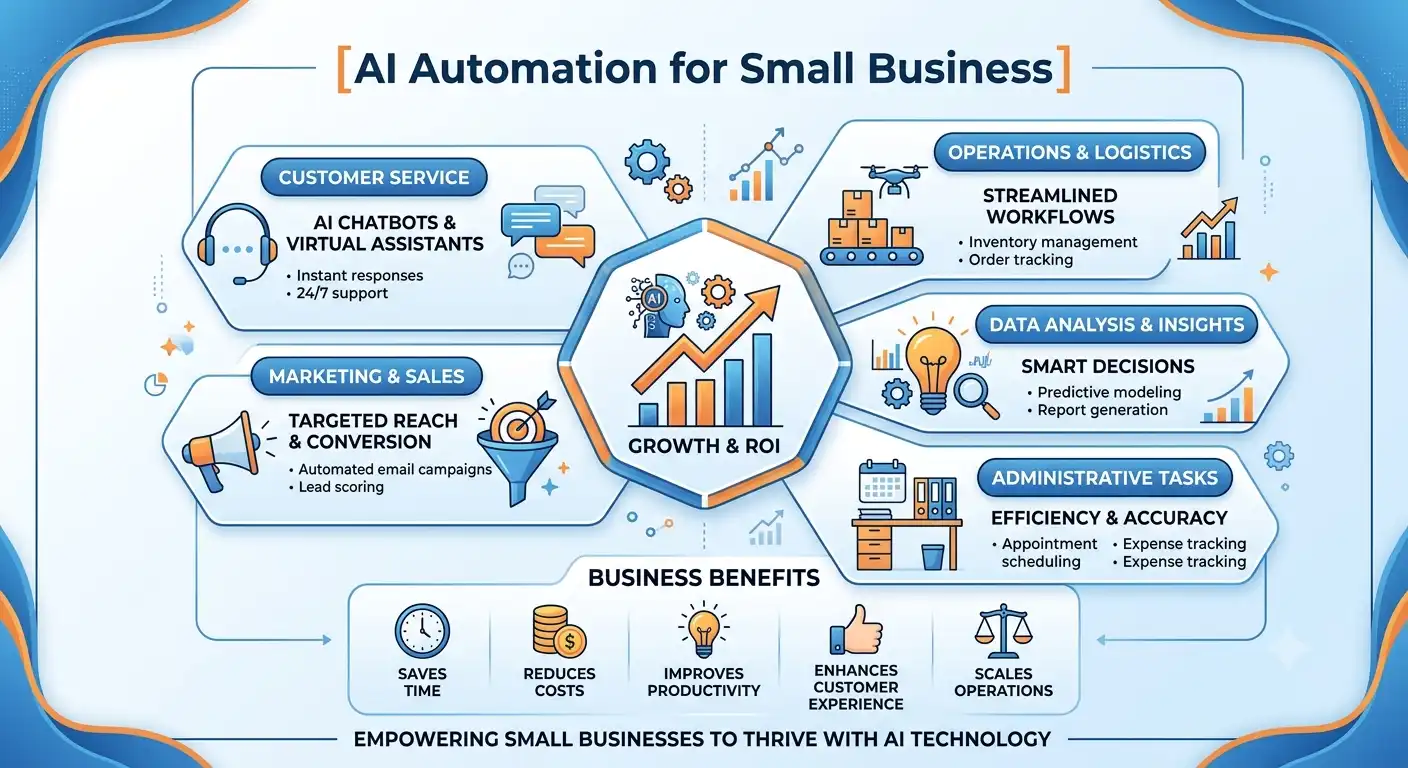
AI automation for small business has moved from an experimental nice-to-have to something most owners can’t afford to skip in 2026. Over 60% of small businesses have already adopted at least one AI-driven automation tool, and the ones doing it right are seeing real productivity gains — not vague promises, but measurable time saved on the repetitive work that eats up every week: replying to leads, scheduling posts, drafting follow-up emails, and chasing invoices.
This guide covers exactly what this looks like in practice for a small business, which workflows to automate first, the tools that make it possible without hiring a developer, and the mistakes that cause most small business owners to buy a tool, use it twice, and abandon it. If you run a local service business, an agency, a retail shop, or a consulting firm, everything here applies without needing a big budget or a technical team.
What Is AI Automation for Small Business?
In short, it means using artificial intelligence tools to handle repetitive tasks — customer replies, marketing content, scheduling, data entry, and lead follow-up — with minimal manual input. Unlike older rule-based automation that only moves data between apps in a fixed pattern, AI-driven tools can understand context, recognize patterns, and make decisions on their own, which is what makes 2026’s generation of tools genuinely different from the automation of five years ago.
How AI Automation Differs From Traditional Automation
Traditional automation follows rigid, pre-programmed rules — if X happens, do Y, every single time. AI automation adapts: it can read an incoming customer message, understand the actual question being asked, and respond appropriately even if the wording never appeared in any script.
Why 2026 Is the Turning Point
Labor shortages, rising customer expectations, and the spread of no-code and low-code platforms have converged to make this kind of automation accessible to small teams without hiring developers or IT staff. What used to take months of custom development now takes days to set up with off-the-shelf tools.
Benefits of AI Automation for Small Business
- Hours saved every week — Business owners who automate content creation, email replies, and scheduling routinely report saving several hours a week that previously went into repetitive manual work.
- Faster customer response times — AI can acknowledge inquiries, answer common questions, and route complex issues to the right person instantly, instead of customers waiting hours for a reply.
- Lower operating costs without losing quality — Automating routine marketing and admin tasks reduces the need to hire additional staff for work that a well-configured AI tool can handle just as consistently.
- More consistent output — An automated posting or follow-up schedule doesn’t get missed during a busy week the way a manual process often does, which keeps your marketing and customer communication reliable.
Types of AI Automation for Small Business
Not every business needs to automate the same processes. Here’s how the main categories break down.
Marketing Automation
This covers AI-generated social posts, ad copy, email sequences, and campaign scheduling — the repetitive marketing tasks that eat the most founder time.
Customer Service Automation
AI chatbots and automated ticket routing answer common questions instantly and escalate anything complex to a human, which is often the fastest win for service-based businesses. If you run a WordPress site, our guide to Tidio WordPress integration walks through setting up an AI chatbot for exactly this purpose.
Lead Follow-Up Automation
AI tools can draft and send personalized follow-up emails to new leads within minutes of a form submission, instead of leads going cold while waiting on a manual reply. Pairing this with the right capture tools matters too — see our comparison of WordPress lead generation plugins for the forms and popups that feed these workflows.
Administrative and Data Automation
This includes automating invoice processing, appointment scheduling, data entry, and report generation — unglamorous work that quietly consumes hours every week.
Agentic Workflow Automation
The newest category in 2026: AI agents that don’t just answer a single question but autonomously execute multi-step workflows, like researching a prospect, drafting a personalized outreach email, and logging the result in your CRM without a human touching each step.
Best Tools for AI Automation for Small Business in 2026
1. ChatGPT / Claude — Best for Content and Drafting
Both platforms handle marketing copy, email drafts, and customer response templates, giving you a fast starting point that you edit rather than write from scratch every time.
Best for: Businesses that need fast first drafts for marketing and communication.
2. Zapier — Best for Connecting Tools Together
Zapier links your existing apps — email, CRM, forms, calendars — into automated sequences, so a new lead form submission can trigger an email, a Slack notification, and a CRM entry all at once.
Best for: Businesses running several separate tools that need to talk to each other.
3. Tidio (Lyro AI) — Best for Customer Service Automation
Tidio’s Lyro AI chatbot answers customer questions instantly on your WordPress site, captures leads in the background, and hands off complex conversations to a human when needed, running around the clock without added staff.
Best for: Service businesses that want instant customer replies without hiring night staff.
4. HubSpot AI — Best All-in-One CRM and Marketing Platform
HubSpot combines CRM, email marketing, lead scoring, and basic AI copywriting in a single dashboard, which removes the need to juggle several disconnected tools for a growing business.
Best for: Businesses that want CRM and marketing automation in one platform.
5. Gumloop — Best for Agentic, Multi-Step Workflows
Gumloop builds workflows that research prospects, draft personalized outreach, post to social media, and track results automatically, representing the more autonomous, multi-step end of AI automation.
Best for: Businesses ready to scale marketing operations without hiring additional staff.
6. Canva Magic Studio — Best for AI Design and Content Assets
Canva’s AI tools generate social graphics, product imagery, and short video content without needing a design agency or a photo shoot, which matters most for businesses posting frequently across social channels.
Best for: Businesses that need a steady stream of visual marketing content.
7. Notion AI — Best for Internal Workflow and Documentation
Notion AI helps organize project notes, summarize meetings, and draft internal documentation automatically, cutting down the admin overhead that builds up around every growing team.
Best for: Small teams that need lighter internal operations without a dedicated ops hire.
How to Start AI Automation for Small Business
Step 1: Audit Your Current Workflows
Before buying any tool, write down every task your team repeats several times a week — replying to leads, posting on social media, updating spreadsheets, scheduling appointments. This list becomes your automation roadmap.
Step 2: Pick the Highest-Impact Task First
Customer-facing automations, like instant chat replies or lead follow-up emails, tend to show the fastest return, since they directly affect how quickly a prospect becomes a customer.
Step 3: Automate One Workflow at a Time
Resist the urge to automate everything simultaneously. One new workflow per week is a realistic pace that lets your team learn the tool without feeling overwhelmed.
Step 4: Measure Before Adding the Next Tool
Track the actual time saved or leads captured from your first automation before adding a second one. This keeps your tool stack lean instead of turning into a pile of unused subscriptions.
Common Mistakes in AI Automation for Small Business
- Buying the tool before identifying the workflow — Many small businesses purchase an AI platform first and figure out what to automate later. This leads to scattered experiments and subscriptions nobody actually uses. Start with the workflow, then pick the tool that fits it.
- Automating everything at once — Trying to roll out five automated workflows in the same week overwhelms both your team and your tracking. A narrow, one-workflow-at-a-time rollout finishes faster and sticks.
- Removing the human touch entirely — AI automation works best as a hybrid — letting AI handle repetitive replies while routing anything nuanced or high-value to a real person. Fully removing human oversight from customer-facing automation usually backfires.
- Ignoring data quality going in — Automation amplifies whatever data feeds it. Messy contact lists or inconsistent lead data will produce equally messy automated follow-ups, so clean your data before automating around it.
AI Automation vs Hiring: What Actually Makes Sense
For small, repetitive, well-defined tasks — like acknowledging inquiries, scheduling, or drafting first-pass marketing copy — AI automation is almost always cheaper and faster to deploy than hiring. For work that requires judgment, relationship-building, or strategic decisions, a human still outperforms automation. The businesses seeing the best results in 2026 aren’t replacing people with AI; they’re using automation to remove the repetitive work so their existing team has more time for the parts of the job that actually need a person.
AI Automation for Small Business: Real-World Examples by Industry
- Local service business (plumber, electrician, contractor): The highest-impact automation here is usually lead follow-up: an AI tool drafts and sends a personalized reply within minutes of a new inquiry, along with an appointment-scheduling link, instead of a prospect waiting hours and calling a competitor instead.
- Retail and e-commerce: Retail businesses see the fastest wins from automating product descriptions, social media graphics, and abandoned-cart follow-up messages, freeing up hours that used to go into manual content creation for every new product listing.
- Agencies and consulting firms: For agencies, the biggest opportunity is client onboarding and reporting — auto-generating first drafts of performance reports and using an AI chatbot to answer common client questions, so account managers spend their time on strategy instead of repetitive status updates.
- Restaurants and local retail shops: Automated review responses, appointment or reservation confirmations, and simple FAQ chatbots handle the bulk of daily customer questions — hours, menu items, parking — without a staff member stopping mid-shift to answer the same question repeatedly.
Tool Comparison: AI Automation Options at a Glance
| Tool | Best For | Starting Price |
| ChatGPT / Claude | Content drafting | Free / ~$20/mo |
| Zapier | Connecting apps together | Free / ~$20/mo |
| Tidio (Lyro AI) | Customer service chatbot | Free / ~$29/mo |
| HubSpot AI | All-in-one CRM + marketing | Free / ~$50/mo |
| Gumloop | Multi-step agentic workflows | ~$97/mo |
| Canva Magic Studio | AI design and visual content | Free / ~$15/mo |
| Notion AI | Internal docs and workflow | ~$10/mo |
How Much Does AI Automation for Small Business Cost?
Most small businesses can start meaningfully with under $100 a month by combining one or two free tiers with a single paid tool for the highest-impact workflow — typically customer service or lead follow-up. As automation proves its value and more workflows get added, a realistic ongoing budget for a small business running three to four automated workflows tends to land between $150 and $400 a month, well below the cost of hiring additional staff to do the same repetitive work manually.
Signs You’re Ready for AI Automation for Small Business
- You’re answering the same questions every day — If your team fields the same handful of questions repeatedly — hours, pricing, availability, shipping times — that repetition is the clearest signal an AI chatbot or automated response system will pay for itself quickly.
- Leads go cold before anyone follows up — When a new inquiry sits unanswered for hours because your team is busy, that delay is costing you sales that automated, instant follow-up would have captured.
- Your team spends more time on admin than on clients — If scheduling, invoicing, and data entry are eating into the hours your team should be spending with customers, that administrative load is exactly what AI automation is built to absorb.
- You’ve outgrown manual spreadsheets and sticky notes — Once your business has enough leads, appointments, or orders that manual tracking starts causing missed follow-ups, that growth itself is the signal to automate before things fall through the cracks.
FAQ: AI Automation for Small Business
Is AI automation expensive for a small business to set up? Many of the leading tools, including Zapier, Tidio, and Notion AI, offer functional free tiers, and even paid plans typically start well under $100 a month, making this accessible without a large upfront budget.
Do I need a developer to set up AI automation? No. Most current AI automation tools use no-code or low-code interfaces, meaning a business owner or team member can set up a working automation without any programming background.
What should a small business automate first? Customer-facing tasks like chat responses and lead follow-up emails usually deliver the fastest, most visible return, since they directly affect how quickly a new inquiry turns into a paying customer.
Can AI automation replace my marketing team? AI automation handles repetitive tasks like scheduling and first-draft copywriting well, but it works best alongside a human who sets strategy and reviews output, rather than replacing that judgment entirely.
How long does it take to see results from AI automation? Most small businesses see measurable time savings within the first few weeks of a properly scoped, single-workflow automation, though full ROI typically becomes clear over the first two to three months.
Which industries benefit most from AI automation? Service-based businesses with high inquiry volume — contractors, agencies, restaurants, and local retail — tend to see the fastest returns, since customer-facing automation directly reduces response time and captures leads that would otherwise be lost.
Do I need to automate my whole business at once? No, and you shouldn’t. Automating one high-impact workflow at a time, measuring the result, then moving to the next is more sustainable than trying to overhaul every process simultaneously.
Conclusion
This isn’t about chasing every new AI tool that launches — it’s about identifying the two or three repetitive tasks quietly draining your week and handing them to a system that can run without you. Start with one workflow, whether that’s an AI chatbot answering customer questions or an automated lead follow-up sequence, measure what it actually saves you, and only then move to the next one. Businesses that follow this narrow, deliberate approach in 2026 are the ones seeing real productivity gains — not just another subscription sitting unused in their dashboard.

Muhammad Safiullah is the AI Agent Development Lead at Rankify SEO & AI Agency, where he builds AI chat agents and automation systems for SaaS and business clients. His work focuses on practical AI implementation that solves real customer support and lead-generation challenges.