
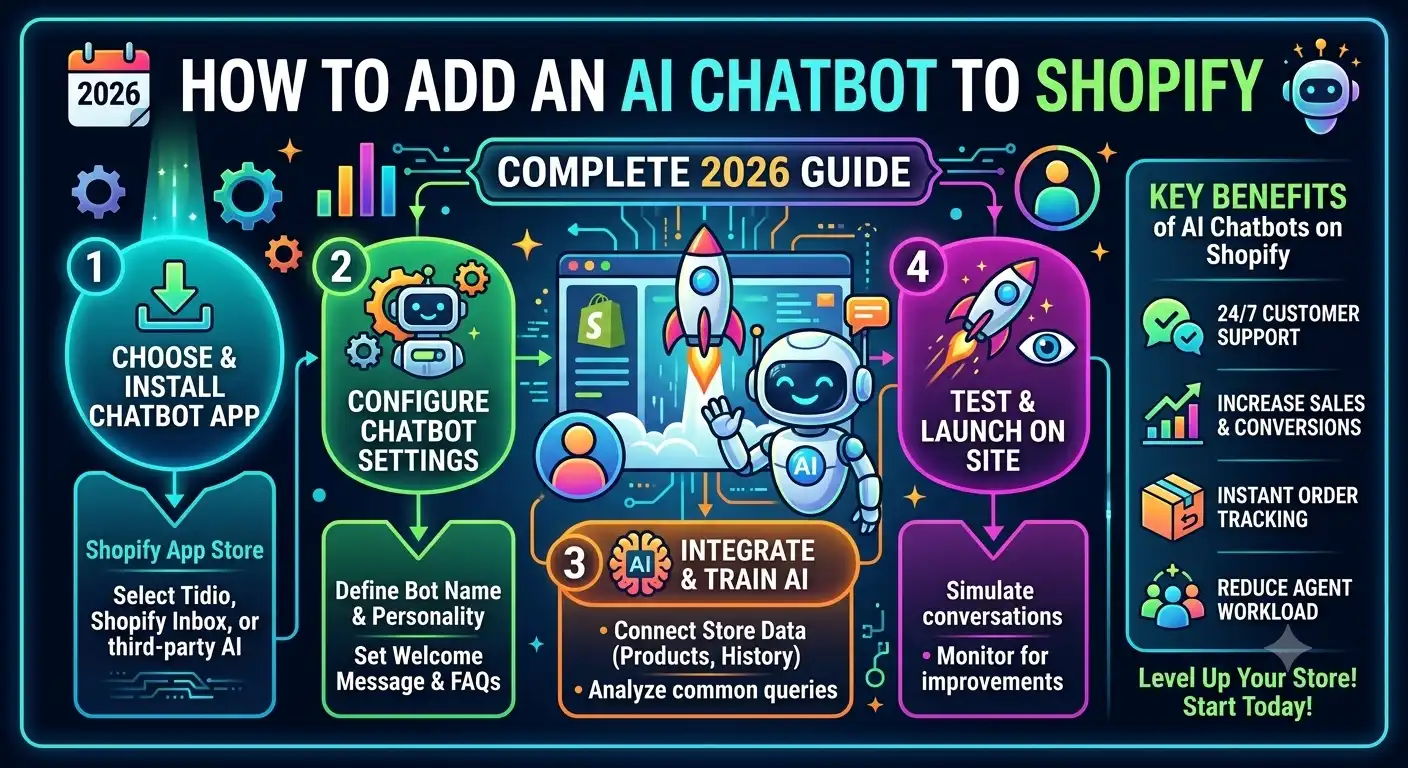
If you’ve been searching for how to add an AI chatbot to Shopify, you’ve probably noticed the same problem showing up in every store owner’s inbox: too many repetitive support questions, not enough hours in the day to answer them. “Where is my order?” “Do you ship internationally?” “Can I return this?” — the same handful of questions, over and over, eating into time that could go toward growing the business instead.
An AI chatbot solves this by handling those repetitive questions automatically, freeing your team to focus on the conversations that actually need a human. This guide walks through exactly how to add an AI chatbot to Shopify, what to look for when choosing one, and how the main options on the market compare.
If you’d rather jump straight in, you can try Tidio’s AI chatbot here — otherwise, here’s the full breakdown.
Why Shopify Store Owners Are Adding AI Chatbots in 2026
Customer support volume grows faster than most store owners expect. A brand that starts with a handful of daily tickets can find itself buried in hundreds within a year of steady growth — and hiring more support agents isn’t always the answer, since it adds cost without necessarily improving speed.
An AI chatbot changes that equation in a few concrete ways:
- 24/7 availability — customers get answers outside business hours, across time zones, without anyone on your team being awake.
- Instant responses to repetitive questions — order status, shipping timelines, and return policies get answered immediately instead of sitting in a queue.
- Lower support costs — automating the repetitive share of your ticket volume means you can handle more conversations without proportionally growing your team.
- Higher conversion rates — a chatbot that responds instantly, rather than making a shopper wait hours for an email reply, keeps more people from abandoning their cart out of frustration.
What to Look for Before You Add a Chatbot to Your Shopify Store
Not all Shopify AI chatbots are built the same way, and the differences matter more than they might seem at first glance.
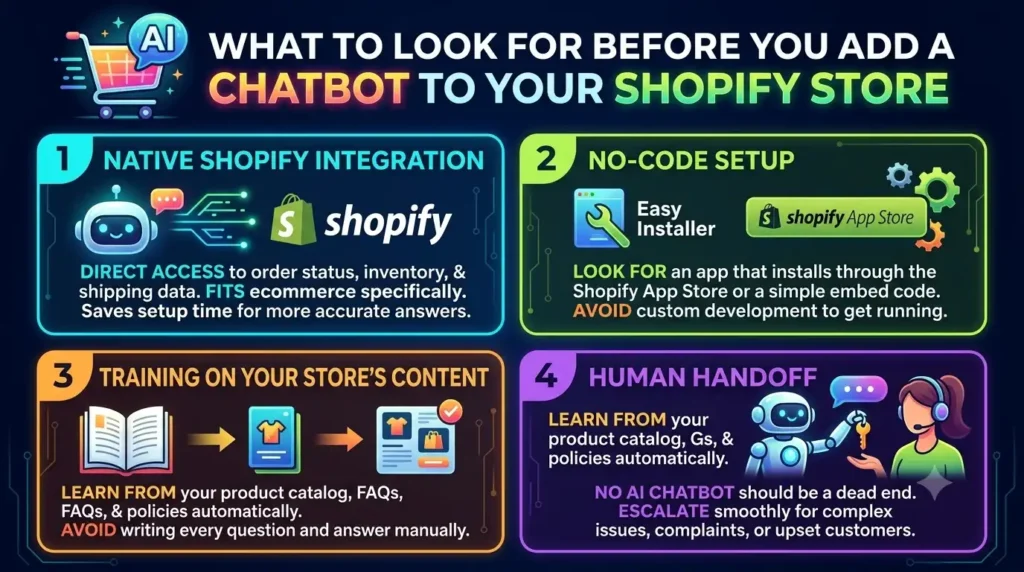
Native Shopify Integration
Some chatbots are purpose-built for ecommerce, with direct access to order status, inventory, and shipping data. Others are general-purpose chat widgets that need custom configuration to pull that same information. The former will save you significant setup time and deliver more accurate answers out of the box.
No-Code Setup
Unless you have a developer on staff, look for a chatbot that installs through the Shopify App Store or a simple embed code — not one that requires custom development work just to get running.
Training on Your Store’s Content
A good AI chatbot should be able to learn from your product catalog, FAQs, and policies automatically, rather than requiring you to manually write out every possible question and answer.
Human Handoff
No AI chatbot should be a dead end. When a conversation needs a real person — a complex complaint, a nuanced question, an upset customer — the chatbot should escalate smoothly to your support team instead of leaving the customer stuck.
Works With Your Existing Helpdesk
This is the detail most store owners overlook. You don’t need to abandon Zendesk, Gorgias, or whatever helpdesk you’re already using just to add an AI chatbot. The best options layer on top of your existing setup rather than requiring a full migration.
How to Add an AI Chatbot to Shopify: Step-by-Step
While the exact steps vary slightly by provider, the general process for adding an AI chatbot to Shopify looks like this:
Step 1: Choose Your Chatbot Provider
Install directly from the Shopify App Store, or sign up on the provider’s website if it’s not listed there. This is the point where the provider you choose matters most — see the comparison section below before committing.
Step 2: Connect Your Store
Most modern AI chatbots connect to Shopify through OAuth (a secure one-click authorization) rather than requiring manual API configuration. This gives the chatbot access to your product catalog, order data, and store information.
Step 3: Let the AI Train on Your Content
The chatbot scans your product pages, FAQs, shipping policy, and return policy to build its knowledge base. This usually takes a few minutes and requires no manual writing on your part, though you can add custom Q&A pairs to fine-tune specific answers.
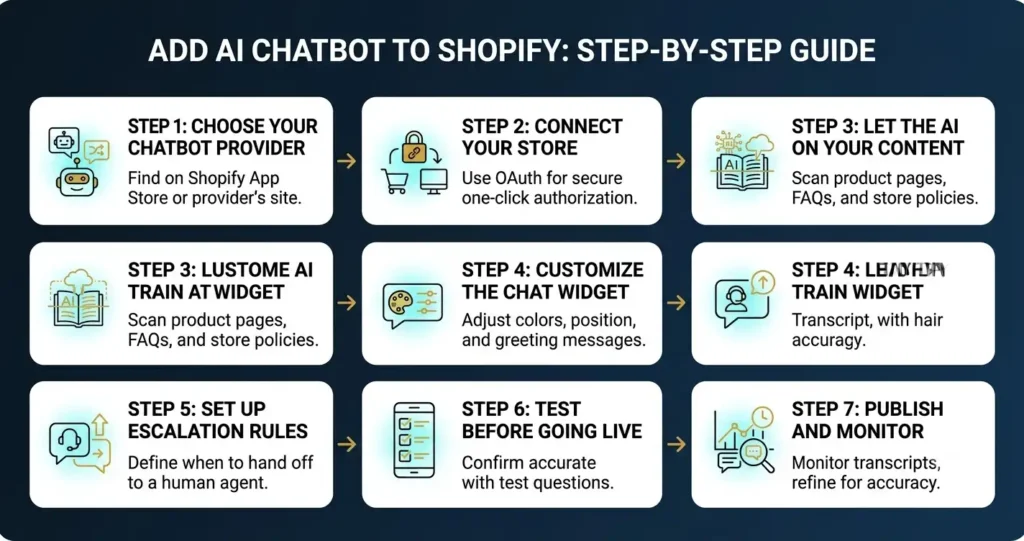
Step 4: Customize the Chat Widget
Adjust the chatbot’s appearance — colors, position, greeting message — so it matches your store’s branding rather than looking like a generic plugin.
Step 5: Set Up Escalation Rules
Define when a conversation should be handed off to a human agent — for example, when a customer asks for a refund exception, expresses frustration, or asks something outside the chatbot’s training.
Step 6: Test Before Going Live
Send test messages covering your most common support questions to confirm the chatbot responds accurately before your customers start interacting with it.
Step 7: Publish and Monitor
Once live, keep an eye on the conversation transcripts for the first few weeks. This is where you’ll spot gaps in the chatbot’s training and refine its answers for better accuracy over time.
Comparing the Top AI Chatbot Options for Shopify
Several tools can technically add an AI chatbot to your Shopify store, but they’re not interchangeable. Here’s how the main categories compare.
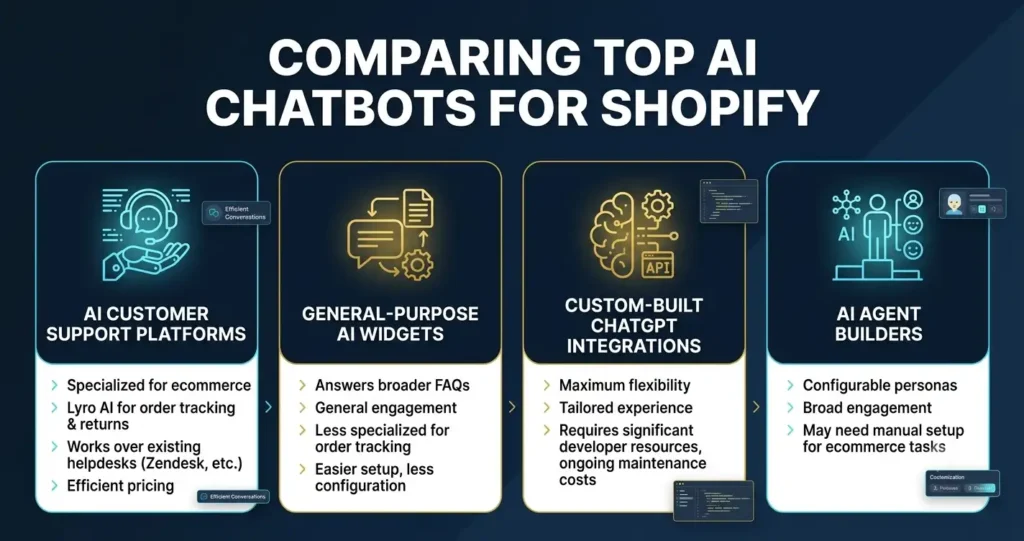
AI Customer Support Platforms (Tidio)
Tools like Tidio are built specifically around customer support, with Lyro AI handling order tracking, shipping questions, and returns automatically. The key advantage here is that Tidio’s Lyro AI works on top of whatever helpdesk you already use — Zendesk, Intercom, Gorgias — so there’s no need to migrate your existing support workflow just to add AI. Pricing is also notably efficient at roughly $0.50 per resolved conversation.
General-Purpose AI Chat Widgets
Some providers offer a more general chatbot that learns from your website content broadly, useful for answering FAQs but often less specialized for order-specific queries like tracking or returns unless configured carefully.
Custom-Built ChatGPT Integrations
It’s possible to build a fully custom chatbot using the ChatGPT API connected to your store’s data. This offers maximum flexibility but requires ongoing developer resources to build, maintain, and troubleshoot — a meaningful cost and time commitment that most small-to-mid-sized stores don’t have readily available.
AI Agent Builders
Some platforms position themselves more broadly as “AI agent” builders rather than support-specific tools, letting you configure a persona and conversational style. These can work well for general engagement but may need more manual setup to handle ecommerce-specific tasks like order lookups out of the box.
The One Decision That Matters Most: Migrate or Layer?
Across nearly every option on the market, there’s one distinction that has the biggest impact on how smooth your setup process will be: does the chatbot require you to migrate your existing support tools, or can it layer on top of them?
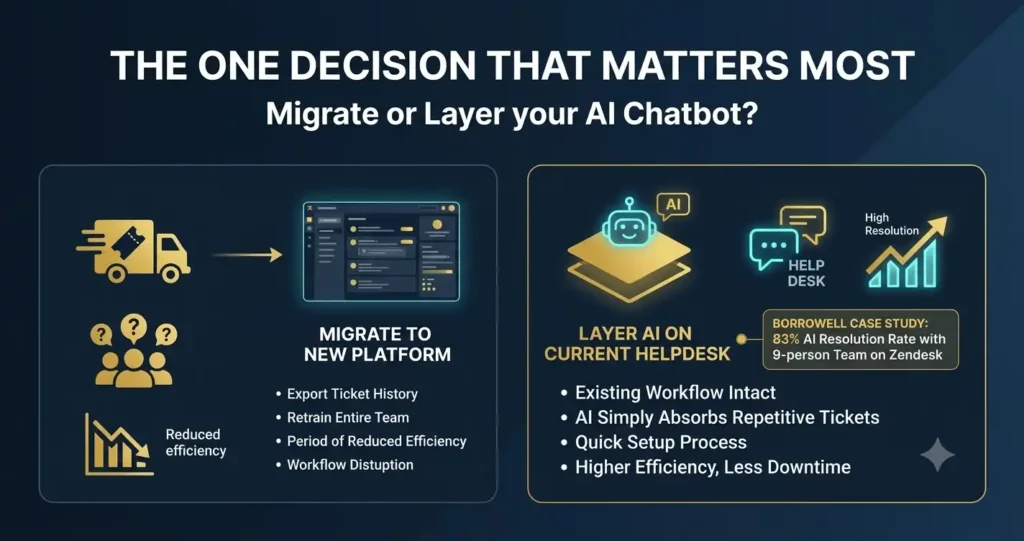
Migrating to a brand-new all-in-one platform means exporting your ticket history, retraining your team, and living with a period of reduced efficiency while everyone adjusts. Layering an AI chatbot on top of your current helpdesk means none of that — your existing workflow stays intact, and the AI simply absorbs the repetitive share of your ticket volume.
This is the approach Tidio takes, and it’s part of why brands like Borrowell were able to add AI support on top of their existing Zendesk setup and reach an 83% resolution rate handling 11,000+ tickets a month with just a 9-person team — without touching their underlying support infrastructure.
Does Shopify Have a Built-In AI Chatbot?
Not by default. Shopify’s native “Shopify Inbox” tool offers basic live chat and some automated replies, but it doesn’t include the kind of AI that can understand natural language questions, pull real-time order data, or learn from your full product catalog the way a dedicated AI chatbot can. If you want genuine AI-powered support — the kind that can answer “where is my order #12345” accurately — you’ll need to add a chatbot app from the Shopify App Store or connect an external tool like Tidio.
This is a common point of confusion for new store owners: Shopify gives you the messaging infrastructure, but the actual intelligence behind an AI chatbot comes from a third-party integration.
What Kinds of Questions Can an AI Chatbot Handle on Shopify?
Beyond the basics, it’s worth understanding just how broad AI chatbot coverage can get once it’s properly trained on your store.
Order and Shipping Questions
This includes order status, tracking numbers, estimated delivery windows, shipping costs to specific countries, and delays. Since this is typically the highest-volume category of ecommerce support tickets, it’s usually the first thing to automate.
Product and Inventory Questions
“Is this available in size medium?” “When will this be back in stock?” “What’s the difference between these two products?” A well-trained chatbot can answer these directly from your live inventory data instead of requiring a manual check.
Policy Questions
Return windows, refund processing times, warranty terms, and exchange policies are static information that a chatbot can recite accurately every time, without a support agent needing to look up the policy document.
Pre-Purchase Questions
Not all chatbot value comes from post-purchase support. A chatbot that can answer sizing questions, compare products, or recommend items based on customer preferences can directly influence conversion rates — turning a browsing visitor into a buyer before they leave the page.
Post-Purchase Engagement
Some AI chatbots also handle post-purchase communication — order confirmations, review requests, and upsell suggestions for complementary products — extending their value beyond pure support into retention and repeat purchases.
Multilingual Support: A Consideration for International Stores
If you sell to customers outside your home market, check whether your chatbot can detect and respond in the customer’s language automatically. This matters more than it might seem — a customer browsing in French or Spanish who receives an English-only chatbot response is far more likely to abandon the conversation (and the purchase) than one who gets a response in their own language. Most established AI chatbot platforms, including Tidio, support multilingual detection and response out of the box.
Analytics and Monitoring: Don’t Set It and Forget It
Once your chatbot is live, the work isn’t over. The best AI chatbots provide conversation analytics that show you:
- Which questions come up most often (useful for spotting gaps in your FAQ or product pages)
- Resolution rate — the percentage of conversations the AI handles without human involvement
- Escalation patterns — what kinds of questions consistently get handed off to your team
- Customer satisfaction signals from post-conversation ratings
Reviewing this data periodically — weekly at first, then monthly once things stabilize — is how you catch a chatbot giving inaccurate answers before it becomes a pattern that frustrates customers.
Data Privacy and Security Considerations
Since an AI chatbot will have access to customer order data, it’s worth confirming a few things before you commit to a provider:
- Where is customer data stored, and does the provider comply with relevant data protection regulations (GDPR, CCPA) for the markets you sell into?
- Can you control what data the chatbot is allowed to access and share?
- Is conversation data encrypted, and who at your organization has access to chatbot transcripts?
Most reputable AI chatbot providers publish this information clearly, and it’s a reasonable question to ask directly if it isn’t.
What Does an AI Chatbot Cost on Shopify?
Pricing models vary considerably across providers, so it helps to understand the general structure before comparing options:
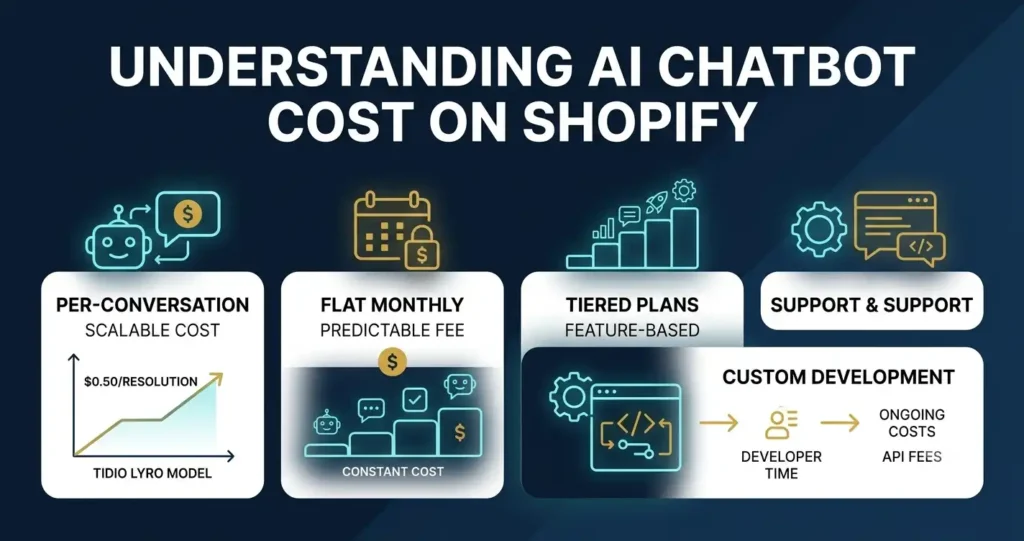
- Per-conversation pricing — you pay based on how many conversations the AI resolves, which scales naturally with your support volume. Tidio’s Lyro AI uses this model at roughly $0.50 per resolved conversation.
- Flat monthly subscription — a fixed fee regardless of volume, which can be more predictable but less cost-efficient for stores with lower ticket counts.
- Tiered plans — pricing that increases in steps based on conversation volume or feature access, common among general-purpose chat widget providers.
- Custom development cost — if you build a fully custom chatbot using the ChatGPT API or similar, you’re paying for developer time on top of any API usage fees, which can significantly exceed the cost of an off-the-shelf tool for most small-to-mid-sized stores.
When comparing costs, look past the sticker price and calculate cost per resolved conversation at your actual ticket volume — a cheap monthly plan that requires heavy human oversight can end up costing more in staff time than a slightly pricier tool with higher automation accuracy.
Custom-Built Chatbots: When Do They Make Sense?
Building a fully custom AI chatbot using the ChatGPT API or a similar language model gives you complete control over behavior, tone, and integrations. This path makes sense in a narrow set of circumstances: you have in-house development resources, your support needs are genuinely unique enough that off-the-shelf tools can’t accommodate them, and you have the ongoing capacity to maintain and troubleshoot the system as your store and product catalog evolve.
For most Shopify store owners, though, this is significant overhead for a problem that established AI chatbot platforms already solve. The maintenance burden alone — keeping the integration working through Shopify API updates, monitoring for accuracy drift, handling edge cases — is often underestimated until a business is a few months into managing it.
Best Practices for a Successful AI Chatbot Deployment
Getting an AI chatbot live is the easy part. Getting it to actually perform well takes a bit more intention.
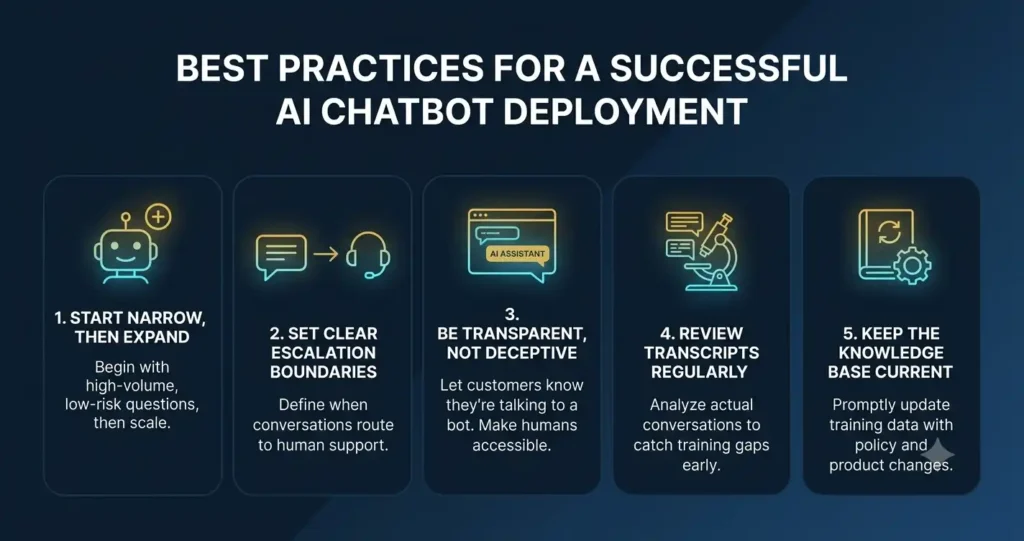
Start Narrow, Then Expand
Don’t try to automate every category of question on day one. Begin with your highest-volume, lowest-risk questions — order status and shipping timelines are the classic starting point — and expand into more nuanced categories as you build confidence in the chatbot’s accuracy.
Set Clear Escalation Boundaries
Decide upfront which situations should always route to a human: refund exceptions, complaints, anything involving a clearly frustrated customer. A chatbot that tries to handle everything ends up handling some things poorly.
Be Transparent, Not Deceptive
Customers generally don’t mind talking to a chatbot as long as they know that’s what’s happening and can reach a human when they need to. Trying to make the bot pass as a person tends to backfire the moment it gives an answer that reveals its limitations.
Review Transcripts Regularly
Especially in the first few weeks, read through actual conversations. This is the fastest way to catch training gaps before they affect a meaningful number of customers.
Keep the Knowledge Base Current
If your return policy changes, or you launch a new product line, update your chatbot’s training data promptly. An AI chatbot answering from outdated information does more damage to customer trust than not having a chatbot at all.
Announce the Change
Let existing customers know you’ve added a new way to get instant support. A brief note in your order confirmation emails or a small banner on your site can drive faster adoption than waiting for people to discover it on their own.
Frequently Asked Questions
How much does it cost to add an AI chatbot to Shopify?
Pricing varies by provider and conversation volume. Tidio’s Lyro AI, for example, costs approximately $0.50 per resolved conversation, which tends to be more cost-effective than general-purpose alternatives for high-volume ecommerce support.
Do I need coding skills to add an AI chatbot to my Shopify store?
No. Most modern AI chatbots, including Tidio, install through the Shopify App Store or a simple embed code, with no custom development required.
Will adding an AI chatbot replace my human support team?
No — a well-configured AI chatbot handles repetitive, high-volume questions and escalates anything requiring judgment or nuance to your human team, rather than replacing them entirely.
Do I have to switch helpdesks to add an AI chatbot?
Not necessarily. Tools like Tidio are built to layer on top of your existing helpdesk (Zendesk, Intercom, Gorgias) rather than requiring a full migration.
How long does it take to set up an AI chatbot on Shopify?
Basic setup typically takes under an hour, though refining the chatbot’s accuracy on your specific product catalog and policies is an ongoing process over the first few weeks.
Will customers know they’re talking to a bot?
With most AI chatbots, yes — and that’s intentional. Being upfront that customers are chatting with an AI assistant (with an easy option to reach a human) builds more trust than trying to disguise it, and avoids frustration if the bot reaches the limits of what it can answer.
What happens if the chatbot doesn’t know the answer?
A properly configured chatbot escalates to a human agent rather than guessing or making up an answer. This is one of the most important settings to configure correctly before going live.
Can the chatbot look up real order status and inventory?
This depends on the provider. Ecommerce-focused platforms like Tidio connect directly to your Shopify order and inventory data, so the chatbot can answer with real, current information rather than generic responses.
Does adding a chatbot slow down my website?
Reputable chatbot providers load their widget asynchronously, meaning it shouldn’t meaningfully affect your page load speed. It’s worth testing your site speed before and after installation to confirm.
Can I see transcripts of past chatbot conversations?
Yes, this is standard across most AI chatbot platforms, and reviewing transcripts regularly is one of the best ways to improve chatbot accuracy over time.
Ready to add an AI chatbot to your Shopify store without migrating your existing helpdesk? Try Tidio here and see how much of your support volume it can handle automatically.
Need help choosing and setting up the right AI chatbot for your store? Get in touch with Rankify SEO & AI Agency — we help ecommerce brands implement AI automation the right way.

Muhammad Safiullah is the AI Agent Development Lead at Rankify SEO & AI Agency, where he builds AI chat agents and automation systems for SaaS and business clients. His work focuses on practical AI implementation that solves real customer support and lead-generation challenges.