
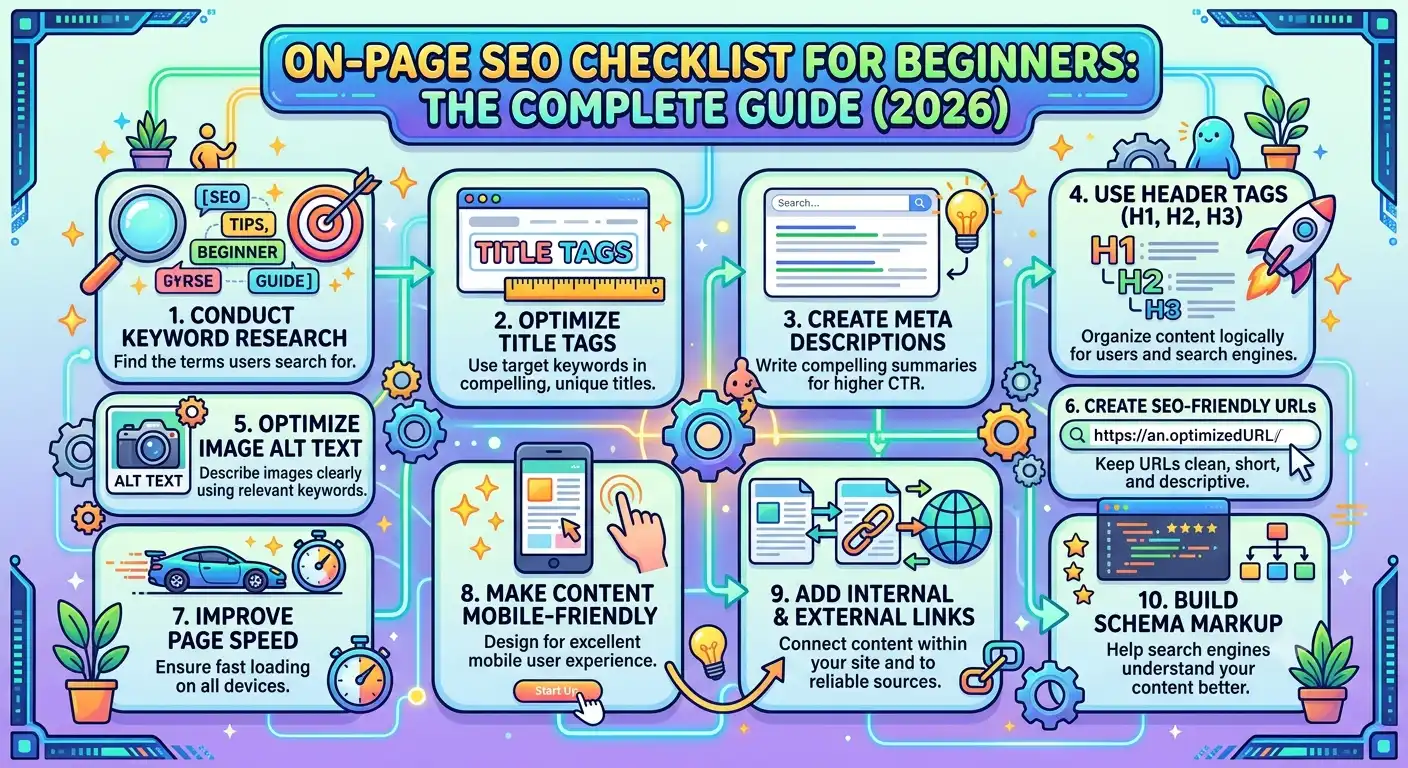
On-page SEO Checklist for Beginners like a checkbox exercise. Stuff a keyword in the title, add a meta description, hit publish, and wait. Six months later, the page is buried on page four of Google, and nobody knows why.
Here’s the truth: on-page SEO isn’t about tricking Google. It’s about proving to Google that your page is the best possible answer to a searcher’s question. Every element on this checklist exists to serve that single goal.
This guide breaks down every on-page SEO factor that actually moves rankings in 2026, organized so you can apply it to any page on your site today.
What Is On-Page SEO?
On-page SEO refers to every optimization you control directly on your web page. This includes your content, HTML structure, images, internal links, and technical elements like title tags. It’s different from off-page SEO (backlinks, social signals) and technical SEO (site speed, crawlability), though all three overlap in practice.
Google’s algorithm has matured past simple keyword matching. Today, on-page SEO is judged through the lens of search intent, topical depth, and E-E-A-T (Experience, Expertise, Authoritativeness, Trustworthiness). A perfectly optimized page that doesn’t satisfy the user will still lose to a rougher page that does.
Types of On-Page SEO
Before diving into the checklist, understand the four categories on-page SEO falls into:
Content-Based On-Page SEO
This covers keyword usage, content depth, readability, and how well the page answers the searcher’s question.
HTML/Structural On-Page SEO
Title tags, meta descriptions, header tags, URL structure, and schema markup all fall here.
Media-Based On-Page SEO
Image optimization, alt text, video embeds, and file compression.
User Experience On-Page SEO
Internal linking, mobile responsiveness, page layout, and dwell-time factors like formatting and scannability.
A beginner who only focuses on content-based SEO and ignores the other three will always underperform. Google looks at the full package.
Step 1: Start With Search Intent, Not Keywords
Before writing a single word, identify what the searcher actually wants. Google groups intent into four types:
- Informational — “What is on-page SEO”
- Navigational — “Yoast SEO plugin login”
- Commercial investigation — “Best SEO plugins for WordPress”
- Transactional — “Buy SEMrush subscription”
Search the target keyword yourself before writing. If the top 10 results are all listicles, don’t publish a single-product review. If they’re all long-form guides, a 500-word post won’t compete. Match the format Google has already validated as the right answer.
Step 2: Title Tag Optimization
Your title tag is the single most important on-page element. It’s the first thing both Google and users see.
- Keep it between 55–60 characters so it doesn’t get truncated in search results
- Front-load your primary keyword whenever it reads naturally
- Include a power word, number, or benefit to improve click-through rate
- Avoid keyword stuffing — one clear keyword mention is enough
Example: “On-Page SEO Checklist for Beginners: 15 Steps That Work” hits the keyword, includes a number, and promises a clear outcome.
Step 3: Meta Description That Earns the Click
The meta description doesn’t directly influence rankings, but it drives click-through rate, which is a strong indirect ranking signal.
- Stay within 150–160 characters
- Include the primary keyword naturally
- Add a clear benefit or call-to-action
- Write it like an ad, not a summary
Step 4: One H1, Multiple H2s and H3s
Every page needs exactly one H1 tag containing the primary keyword. This isn’t optional in 2026 — duplicate H1s confuse both search engines and screen readers, and Google has repeatedly flagged this as a structural clarity issue.
Below the H1:
- Use H2 tags for main sections
- Use H3 tags for subsections under each H2
- Keep headers descriptive, not clever — users scan headers before reading
A well-structured page might look like this:
- H1: On-Page SEO Checklist for Beginners
- H2: What Is On-Page SEO
- H2: Title Tag Optimization
- H3: Character Limits
- H3: Power Words and CTR
This hierarchy helps Google understand topic relationships and helps users navigate long content without leaving the page.
Step 5: URL Structure
Keep URLs short, keyword-focused, and free of stop words.
- Good: /on-page-seo-checklist/
- Bad: /2026/03/the-best-on-page-seo-checklist-for-total-beginners/
Shorter URLs are easier to share, easier to remember, and slightly favored in ranking studies, though the effect is small compared to content quality.
Step 6: Keyword Placement (Without Stuffing)
Place your primary keyword in these locations naturally:
- Title tag
- H1
- First 100 words of the body content
- At least one H2
- Meta description
- Image alt text (where relevant)
- URL slug
Beyond this, use related keywords and synonyms throughout the content instead of repeating the exact match phrase. Google’s language models now understand semantic relationships, so natural variation signals topical depth rather than keyword manipulation.
Step 7: Content Depth and Readability
Google rewards content that fully answers a query, not content that’s simply long. That said, thin content rarely ranks for competitive terms because it can’t cover every subtopic a user might need.
Readability standards that consistently perform well:
- Short sentences, simple vocabulary (Hemingway Grade 3 level works for most consumer content)
- Transition words in roughly 30% of sentences to improve flow
- Active voice for at least 90% of the content
- Short paragraphs — 2 to 4 sentences maximum
- Bullet points and numbered lists for scannable information
Readers skim before they commit to reading. If your page looks like a wall of text, they’ll bounce before your content even gets a chance to prove its value.
Step 8: Internal Linking
Every page should link to 3–5 relevant pages on your own site. Internal links do three things:
- Distribute page authority (“link equity”) across your site
- Help Google discover and crawl deeper pages
- Keep users engaged longer, improving dwell time
Use descriptive, keyword-rich anchor text instead of generic phrases like “click here.” Link to genuinely relevant pages — irrelevant internal links confuse both users and search engines about page relationships.
Step 9: Image Optimization
Images affect both user experience and page speed, which is a direct Core Web Vitals factor.
- Compress images to WebP format before upload
- Add descriptive alt text with the keyword where it fits naturally
- Use lazy loading for below-the-fold images
- Never lazy-load your hero image — it delays Largest Contentful Paint (LCP)
- Name image files descriptively before uploading (on-page-seo-checklist.webp, not IMG_4021.webp)
Step 10: Schema Markup
Structured data helps Google understand your content type and can unlock rich results like FAQ dropdowns, star ratings, and How-To carousels.
For a beginner checklist article like this one, the most valuable schema types are:
- Article schema — establishes authorship and publish date
- FAQ schema — powers the “People Also Ask” style dropdown in search results
- BreadcrumbList schema — improves how your URL displays in search
Most SEO plugins, including Yoast, generate this automatically through built-in content blocks, so manual JSON-LD coding usually isn’t necessary for standard content types.
Step 11: E-E-A-T Signals
Google’s quality guidelines emphasize Experience, Expertise, Authoritativeness, and Trustworthiness on every page, not just YMYL (Your Money Your Life) content.
Practical ways to demonstrate E-E-A-T on a standard blog post:
- Include a real author bio with credentials
- Reference credible sources (.edu, .gov, established publications)
- Add original examples or data points instead of only paraphrasing competitors
- Keep information accurate and update it when it becomes outdated
- Avoid clickbait claims that the content doesn’t back up
A page with strong E-E-A-T signals consistently outperforms thinner competitors, even when the competitor has more backlinks.
Step 12: FAQ Section
Adding a FAQ section serves two purposes: it captures long-tail question keywords, and it qualifies your page for FAQ rich snippets in search results.
Structure each FAQ answer to be self-contained — a user should understand the answer without needing to read the rest of the article.
Step 13: Mobile and Core Web Vitals
Over half of search traffic comes from mobile devices, and Google uses mobile-first indexing, meaning it primarily crawls and ranks based on your mobile page version.
Baseline targets:
- LCP (Largest Contentful Paint): under 2.5 seconds
- CLS (Cumulative Layout Shift): under 0.1
- INP (Interaction to Next Paint): under 200 milliseconds
Pages failing these thresholds face a ranking disadvantage, particularly in competitive niches where content quality is otherwise similar across competitors.
The Complete Beginner Checklist
Use this as your final pre-publish checklist:
- Keyword matches search intent (checked top 10 results)
- Title tag: 55–60 characters, keyword front-loaded
- Meta description: 150–160 characters, includes CTA
- One H1 with primary keyword
- Logical H2/H3 structure
- Short, keyword-focused URL slug
- Primary keyword in first 100 words
- Related keywords used naturally throughout
- Short sentences and paragraphs, active voice
- 3–5 internal links with descriptive anchor text
- Images compressed, alt text added, hero image not lazy-loaded
- FAQ schema block added
- Author bio and credible external sources included
- Mobile page speed tested against Core Web Vitals thresholds
Conclusion
On-page SEO for beginners isn’t about memorizing rules — it’s about consistently proving your page deserves to rank. Every element on this checklist, from title tags to internal links to E-E-A-T signals, works together to signal one thing to Google: this page fully satisfies the person who searched for it.
Start with search intent, build a proper content structure, optimize your technical elements, and back everything with genuine expertise. Do this consistently across every page, and rankings become a natural result rather than a guessing game.
Frequently Asked Questions
What is the most important on-page SEO factor? Search intent match matters more than any single technical element. A page can have a perfect title tag and meta description, but if it doesn’t match what the searcher actually wants, it won’t rank.
How long should a blog post be for good SEO? There’s no fixed word count. Content length should match what’s needed to fully cover the topic and match the depth of top-ranking competitors, whether that’s 800 words or 3,000.
Do I need schema markup for on-page SEO? Schema markup isn’t a direct ranking factor, but it improves how your page appears in search results through rich snippets, which can increase click-through rate.
How many keywords should I target per page? Focus on one primary keyword and its closely related variations. Targeting multiple unrelated keywords on a single page usually leads to weaker rankings for all of them.
Does on-page SEO still matter with AI-generated search results? Yes. Google’s AI Overviews and other generative search features still pull from well-structured, authoritative pages. Strong on-page SEO increases the chance of being cited as a source in these AI-generated summaries.

Asrar Ahmad is the founder and lead SEO strategist at Rankify SEO & AI Agency, with 4+ years of experience in technical, on-page, and off-page SEO for US and UK clients. He specializes in topical authority building, keyword strategy, and data-driven content that ranks and converts.